IRIS payments
epay supports every method of payment acceptance and offers the ability to accept payments via IRIS both on POS & softPOS terminals and in e-shops. Businesses can accept account-to-account payments both at physical terminals and in e-commerce.

IRIS payments
epay supports every method of payment acceptance and offers the ability to accept payments via IRIS both on POS & softPOS terminals and in e-shops. Businesses can accept account-to-account payments both at physical terminals and in e-commerce.

What are IRIS payments;
With IRIS Payments, a business or professional can receive account-to-account payments both at physical terminals and in e-commerce.
Advantages for businesses
Compliance with new legislation
Additional payment acceptance method
Settlement
Flexibility with no transaction amount limit
Easy Integration
IRIS payments acceptance at physical stores
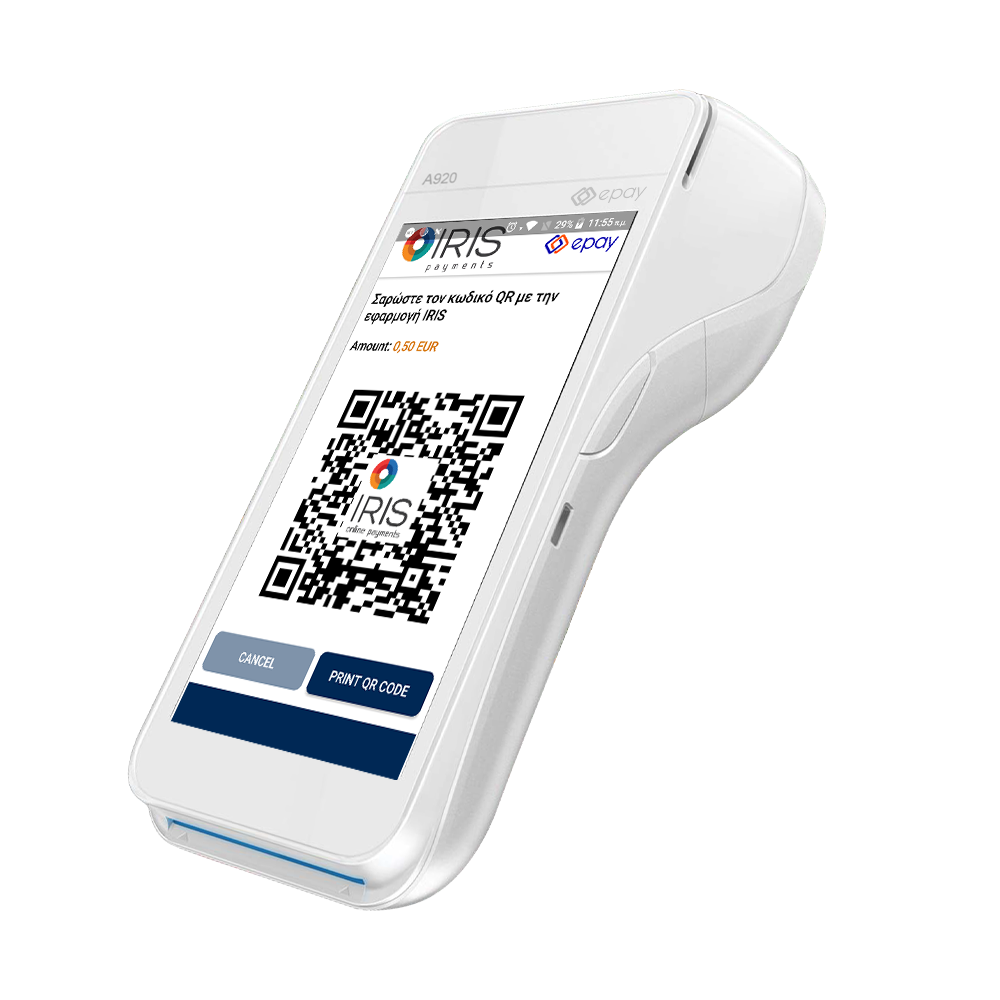
IRIS payments acceptance will be supported on both Android POS and older technology terminals.
If the customer wishes to pay via IRIS:
- The user selects “Alternative Payments” on the terminal, then “IRIS,” and a QR code appears on the screen (for Android POS) or instantly printed (for older terminals).
- The customer scans the QR code via his bank’s mobile banking app and accepts the transaction amount to transfer the funds to the merchant for payment.
- The payment is completed instantly by debiting the customer’s account, and a receipt is printed like a card transaction.
Wireless terminals will support IRIS payments for preloaded transactions. A preloaded transaction can be split into multiple sub-transactions (split-payments) and paid with IRIS, cash or card.
IRIS payments acceptance in e-commerce
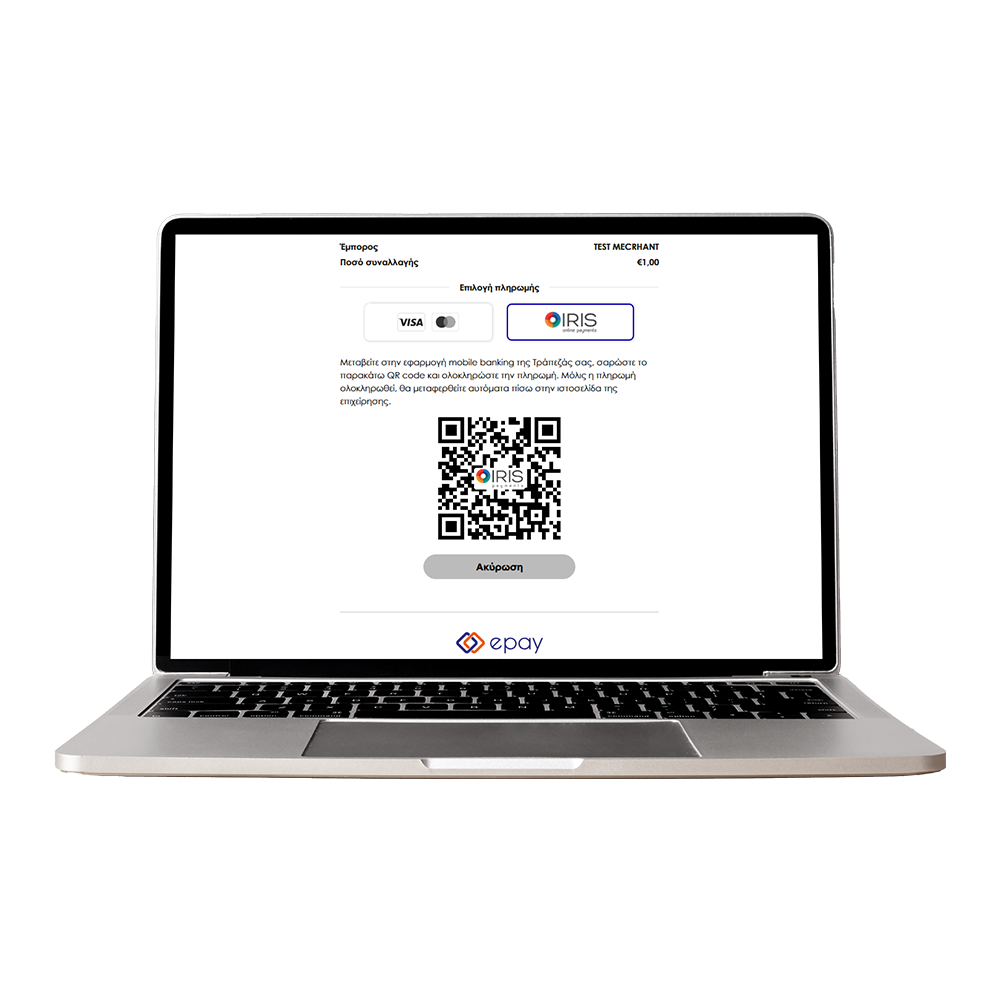
In e-commerce, IRIS will be integrated into the epay by link service, as well as in each eshop connected via Redirection or iFrame.
IRIS transactions from mobile devices (app2app) will be available soon.
To pay via IRIS, customer:
- Selects IRIS as the payment method on the epay page, and a QR code appears on the screen.
- Scans the QR code via his bank’s mobile banking app and accepts the transaction amount to transfer the funds to the merchant.
- The payment is completed instantly, and the user is redirected to the business’s website.
FAQs
What are IRIS payments?
Businesses can accept account-to-account payments both at physical terminals and in e-commerce. The service directly debits the customer’s account and transfers the funds to your business account.
Is accepting IRIS payments mandatory?
The effective date for the obligation to accept payments via IRIS has been modified. Starting December 1, 2025, all businesses that transact with private consumers are required to support IRIS payments, both in physical stores and e-shops. (The original effective date was November 1, 2025.)
Which epay services support IRIS payments?
Euronet Group, through ECS and EMS-epay, supports IRIS payments in e-shops and all POS/softPOS models in Greece:
- POS & softPOS: Android POS (PAX, Sunmi), older terminals (Verifone, Ingenico), and softPOS.
- eCommerce: Redirection, iFrame, and epay by link.
When will I receive the funds?
Funds are credited similarly to card transactions. With All Week Pay, crediting occurs daily, including weekends and holidays.
How does IRIS work on POS terminals?
- At the POS card screen, user selects “Alternative Payments”
- “IRIS” QR code appears on screen or prints.
- Customer scans QR via mobile banking and confirms payment.
- Payment completes instantly; receipt is issued.
How does IRIS work in eCommerce?
- Customer selects IRIS on the epay payment page.
- Scans QR via mobile banking and confirms payment.
- The payment is completed instantly, and the user is redirected to the business’s website.
Is IRIS payments service secure?
Yes. Customers authenticate via their bank’s e-banking app using credentials, biometrics, or one-time passwords.
What is the cost of IRIS payments for my business?
A personalized update has been sent via email or Viber to inform you about the IRIS transaction fee, both for POS terminals and eCommerce.
Customers can use IRIS free of charge.
I have a POS or e-shop with epay. What is required to activate IRIS payments with epay?
No action is needed. epay has taken all necessary actions to activate IRIS, and the upgrade of all POS terminals will be carried out automatically gradually from 23rd of October onwards.
We encourage you to keep your POS terminals continuously connected to power and the internet to ensure they receive the upgrade.
Additionally, you may consult your cash register system provider to confirm compatibility for accepting IRIS payments.
What do I need to do for Redirection/iFrame?
No action is needed. epay will auto-enable IRIS for sales only (not preauth or recurring).
Technical teams should note differences in response parameters (e.g., PaymentMethod=’IRIS’, no Token, CardNumber, etc.). We suggest that you update checkout label to “Pay by card or IRIS”.
What about epay by link?
No action needed. IRIS will be auto-enabled for sales transactions only.
What about Web Service?
In the case of Web Service you must:
- Sign a Redirection contract at a Piraeus Bank branch.
- Add “Pay with IRIS” option at checkout.
- Implement Redirection integration with your tech partner.
Can I use IRIS with vPOS?
No. IRIS requires customer interaction via mobile banking. Apply for epay by link if you want IRIS without an e-shop.
Where can I find the IRIS logo?
Logos are available online in the folder Icons/IRIS.
I use pre-authorizations on my POS terminal and/or e-shop. Will I be able to support IRIS payments?
No. IRIS payments service involves transferring money from the customer’s account to the business’s account and does not support pre-authorizations.
In my e-shop, I accept card payments for the first transaction of a recurring payment. Can I offer IRIS payments?
No, IRIS payments service does not support recurring transactions. If your e-shop sends recurring payments through the Redirection or iFrame service, the IRIS option will not appear on the payment page.
In my e-shop, I use the Tokenization service so that customers enter their card details only during the first transaction. Is Tokenization supported for IRIS payments?
No, the IRIS payments service does not support Tokenization. After completing an IRIS payment on your e-shop, no values will be returned in the Token, CardNumber, or CardExpDate fields.
In a transaction on my e-shop, the customer selected installments. Can the payment be made via IRIS with installments?
No, IRIS payments do not support installments.
If the customer has selected installments on the e-shop and then chooses IRIS as the payment method, they will be informed that the full amount will be charged before completing the transaction.
What if a customer claims they were charged but I didn’t receive confirmation?
Contact epay Contact Center at 210-3898954 immediately.
How do I issue a refund?
Send a request to returns@epayworldwide.gr with the following information:
SUBJECT: IRIS refund
• MID: …………..……
• Original Transaction Amount: …………..……
• Original Transaction Date: ……/……/20……
• Approval Code: …………..……
• Refund Amount: …………..…
Please note that only full refunds are available and that response is given within 10 business days.
What about disputes?
There is no legal framework for IRIS transaction disputes via DIAS.
Can I request the deactivation of the IRIS payments service?
Businesses that transact with private consumers are required to support IRIS payments, both in physical stores and in e-shops.
The IRIS service has been automatically activated for your business, and you incur no charges unless you make transactions. For each successful transaction, you are charged according to the service’s pricing for physical points or eCommerce.
If you have another provider for IRIS transactions and wish to deactivate the service, you can request its deactivation through the contact form or by calling our call center.